Learn how Centinel keeps your checking-account forecast aligned with your bank through balance anchoring, transaction matching, queues, and alerts.
March 15, 2026
A forecast calculated once is only accurate until something changes. A transaction posts a day late. An amount differs from what was scheduled. An unexpected charge appears. None of these are dramatic failures on their own, but they compound. Two weeks of small, uncorrected discrepancies can leave the projected balance you're looking at three weeks from now hundreds of dollars off from what the account will actually show.
Keeping a forecast accurate is therefore an ongoing practice, not a one-time setup. Centinel’s checking account forecast does this by continuously aligning the forecast with your connected bank account: anchoring the forecast to your real checking balance, then reconciling projected cash-flow events against the transactions that actually post. This article explains the reconciliation side of that process — how Centinel compares the forecast to reality, what it resolves automatically, and when it asks you to make the judgment call.
Reconciliation is the system that keeps Centinel’s forecast aligned with what is actually happening in your bank account.
It operates on two levels. First, the starting balance has to stay current. If the forecast begins from the wrong balance, every projected day after that inherits the error. Second, the projected cash-flow events have to stay current. A scheduled bill may post for a different amount. A payment may arrive a day late. A new recurring charge may appear. A forecast stays useful only if those differences are caught and resolved.
Centinel handles that through balance anchoring and cash-flow event reconciliation. Balance anchoring keeps the forecast’s starting point tied to the real checking balance. Cash-flow event reconciliation compares what Centinel expected to happen against what actually posted to the bank, then either resolves the difference automatically or surfaces it for your review. Together, those mechanisms prevent the forecast from drifting away from reality.
Of the two mechanisms, balance anchoring is the simpler one. Each morning, Plaid re-anchors Centinel's projection to your real checking balance, so the walk-forward calculation always begins from where the account actually is today rather than from where yesterday's forecast calculated it should be. There's nothing for you to do — the sync happens in the background, and the entire forecast recalculates from the refreshed starting point. A forecast that runs from a stale balance inherits that error across every subsequent day. Daily anchoring eliminates that error at the source.
A forecast’s cash flow events drift in two ways. Either something was projected to post and didn't, or something posted that the forecast didn't fully anticipate. The second pattern has two shapes inside it: a scheduled event posts with a different amount or on a different day than projected, or a transaction posts that wasn't in the forecast at all.
Reconciliation is the system that catches all three cases. Most of the work happens automatically. Centinel’s automated core is transaction matching: each posted transaction is scored against your scheduled events on four signals — amount, date, merchant, and category — and the high-confidence cases resolve silently, capturing the real amount and recalculating the forecast without involving you. Matching handles the routine majority. Most of the time, reconciliation is invisible.
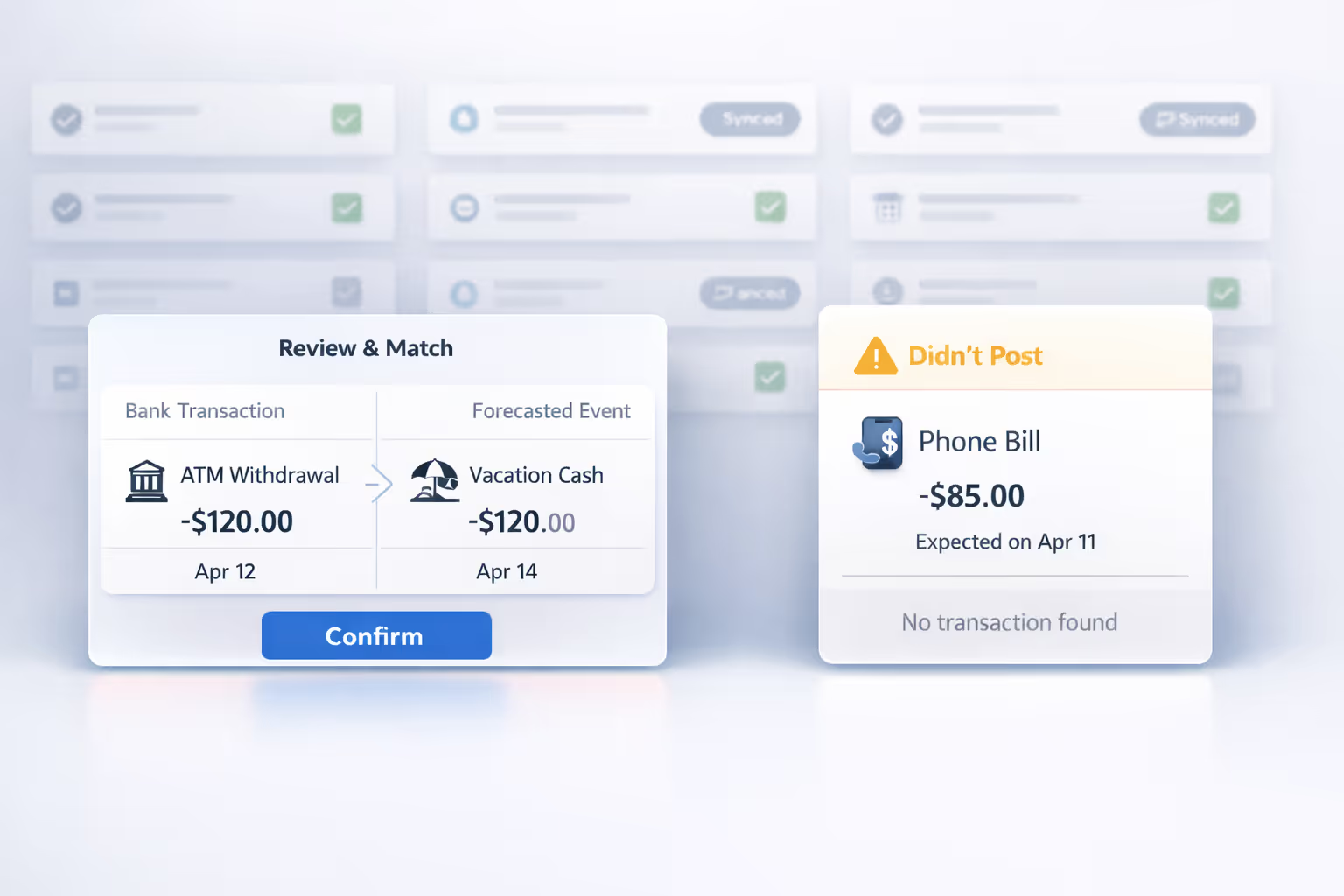
Anything matching can't resolve silently surfaces for your judgment, in one of two places. The reconciliation queue handles transactions that posted — whether matching's confidence was too low to auto-resolve, or no scheduled event corresponds to the transaction yet. Didn't-post alerts handle the inverse: scheduled events that didn't produce a transaction by the expected date.
The reconciliation queue lives in Centinel's Transactions tab. When matching scores a transaction below the auto-match threshold, the transaction lands in the queue for your review, and Centinel notifies you each morning of how many items are waiting.
Queue items come in two forms. Some arrive with a suggested match — matching has a best guess about which forecasted event the transaction corresponds to, but its confidence wasn't high enough to act autonomously. You see the bank transaction details (amount, date, merchant) alongside the suggested event. Others arrive with no suggestion — the confidence was too low to propose any match, which typically means the transaction is a one-time charge, a new recurring pattern, or an event that looked very different from what was expected.
For every item in the queue, you have a specific set of actions. Each one has a different meaning for the forecast and teaches the matching algorithm something different about your financial patterns.
The system proposed that a bank transaction corresponds to a specific event, and you agree. You tap confirm, and the transaction is linked to the event. If the actual amount differed from the forecast estimate — your electricity bill was $168 instead of the projected $150 — the forecast recalculates with the actual amount flowing through. The event's matching profile is updated: the merchant name and category from the bank transaction are stored, strengthening the system's ability to auto-match this event in future months. This action is designed to take seconds. The system has already done the work of identifying the most likely match — you're just validating its judgment.
Sometimes the system's suggestion is wrong. The algorithm proposed that a $9.99 charge matches your Spotify subscription, but it's actually your iCloud storage payment — a different event with a similar amount and date. You select the correct event from your list, and the match is recorded against it instead.
This correction is particularly valuable for the matching algorithm's learning loop. The incorrectly suggested event's profile is not updated with the misleading transaction data. The correctly identified event's profile is strengthened with the merchant name and category from the bank transaction. Over time, corrections like this teach the system to distinguish between events that look similar in the bank feed — two subscriptions that charge similar amounts mid-month, for instance — so it can make the right determination automatically in future months.
This is the resolution that expands your forecast to cover patterns it wasn't previously tracking. A $99 charge posts to your account, and it doesn't match anything on the forecast. You notice that this was the insurance you signed up for but forgot to add. You tap it and create a new recurring event directly from the transaction. Centinel uses the transaction's data — the amount, the merchant name, the category, the date — to seed the new event's matching profile. The next time this charge posts, the system already knows what it looks like and can match it automatically, often with high enough confidence to auto-resolve without ever reaching the queue.
Not every bank transaction corresponds to a recurring event. An ATM withdrawal, a restaurant meal, a one-time online purchase, a reimbursement from a friend — these are transactions that happened, that affected your balance, but that don't represent an ongoing pattern. You dismiss the transaction, and it's marked as reconciled with no event association. There's no forecast impact beyond what the balance sync already captured, because the balance already reflects this transaction's effect on the account.
You can also reverse a previous match — whether it was auto-matched by the system or manually confirmed from the queue. This handles the rare case where the system matched a transaction to the wrong event, or where you matched a transaction and later realized it was incorrect. When a match is reversed, the event's matching profile is updated to reflect the correction — the misleading merchant data or category from the wrong transaction is removed — and both the transaction and the event return to an unresolved state for you to re-resolve.
The inverse case — a forecasted event whose expected date came and went without a corresponding bank transaction — surfaces through Centinel's Alerts section. Your $65 gym membership was due on the 15th, but on the 16th, no matching debit has appeared. Your Netflix subscription was scheduled for the 1st, but nothing posted.
The alert tells you which event was expected, what amount was projected, and that no corresponding transaction was detected. Centinel does not automatically carry the missed occurrence forward into future days of the forecast. Otherwise, the forecast would keep reserving cash for an outflow that may never happen at all. If the transaction eventually posts, the balance sync captures the updated account balance, and Centinel’s matching logic processes the transaction when it arrives.
From a didn't-post alert, you have two paths.
The first is to dismiss the alert. You're telling Centinel: "I know this didn't post, and that's expected." Maybe the payment was intentionally skipped this month, or it was charged to a different account. The alert clears, and the recurring event remains in your forecast unchanged for future occurrences.
The second is to add the expected event back to your forecast with a new expected date. You're telling Centinel: "This is just late — it's still going to post, and I want my forecast to reflect that." You select when you expect it to post (today, tomorrow, or a custom date), and Centinel re-inserts that occurrence into the forecast at the new date. The recurring event template remains unchanged — the adjustment only affects the current occurrence, so future months project normally.
If the underlying obligation has changed permanently — you cancelled the gym membership, or the billing date shifted to a new day of the month — you'd handle that by modifying or deleting the event itself from your saved events, which is a maintenance action rather than an alert response.
Reconciliation — balance anchoring, the matching engine, the queue, and the didn't-post alerts together — is the mechanism that prevents silent forecast drift. Without it, discrepancies between projection and reality would accumulate unnoticed. Each individual discrepancy might be small, but over weeks they compound, and at some point the projected balance you're acting on bears little resemblance to where the account is actually going.
What you get from reconciliation done well is a forecast that stays current with minimal manual attention. The matching engine handles the routine comparison without involving you. The queue and alerts surface only the cases that need your judgment. The feedback loop between them means the system learns your patterns over time, requiring progressively less attention while keeping the projections aligned with what's actually happening in your account. That's what makes Centinel's forecast a living system rather than a static projection — and what makes the numbers you see at any given moment numbers you can act on.
STAY A STEP AHEAD