How Centinel scores each posted transaction against your scheduled events on four signals and routes the result into three tiers of confidence.
March 15, 2026
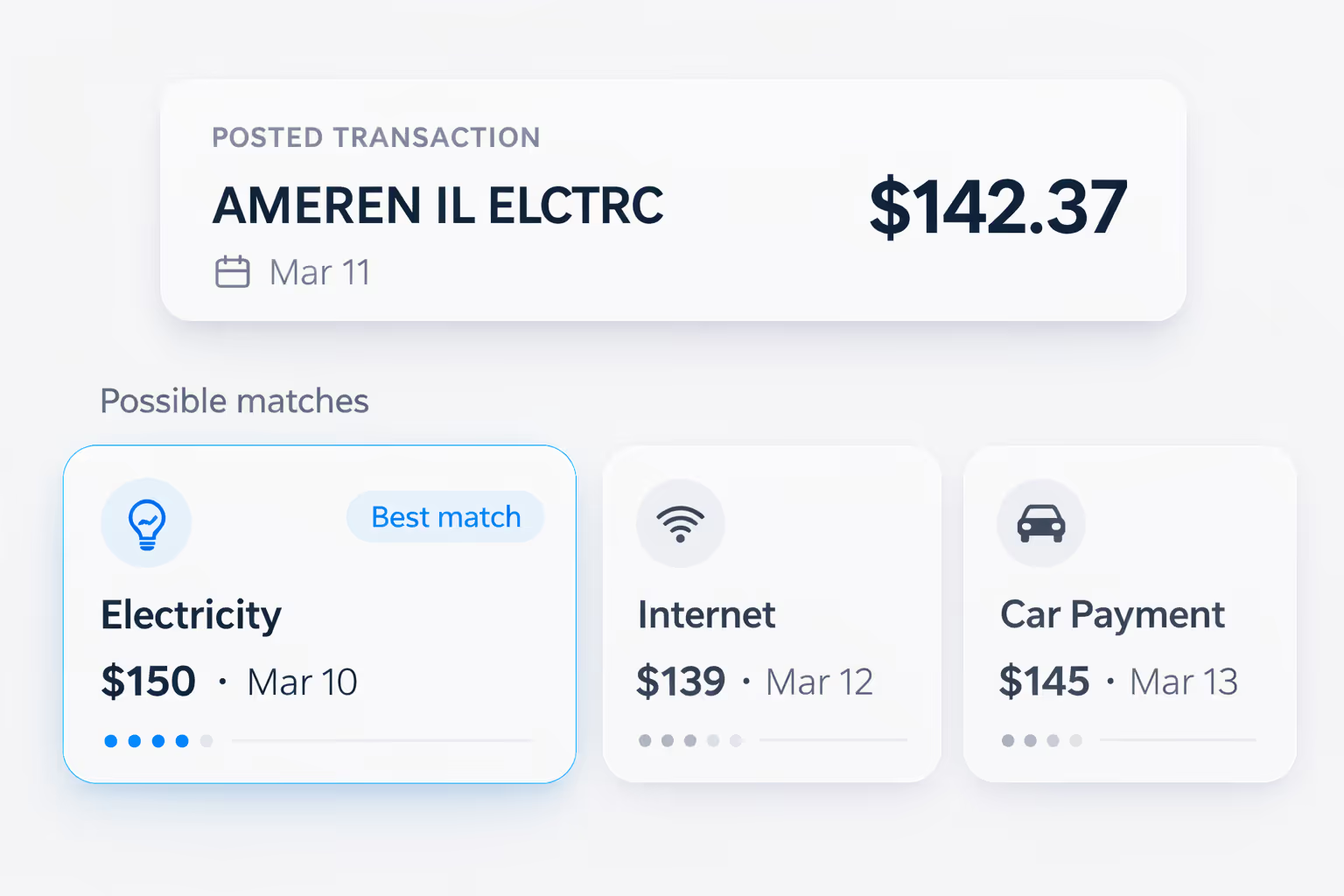
A $142.37 debit posts to your checking account on March 11th. The merchant name in your bank feed reads "AMEREN IL ELCTRC." Your forecast has a $150 electricity payment scheduled for March 10th. Is that the same event?
Probably. It's the right general category — a utility payment. The amount is close. The timing is one day off. But "probably" isn't "definitely." The amount doesn't match exactly, the date is a day late, and the merchant string in the bank feed doesn't obviously correspond to the plain-English "electricity" label you typed when setting up the event.
Now consider that this determination has to happen not just for your electricity bill, but for every transaction that posts to your account — your paycheck, your rent, your car payment — potentially dozens of events per month. Some matches will be obvious. Others will be ambiguous. And the system making the determination can't pause to ask about every single one, because the whole point of automation is to reduce the work you have to do, not create a new stream of questions.
This is the transaction matching problem: given a bank transaction that just posted, determine which forecasted event it corresponds to — if any — with enough confidence to act on the answer. Matching is the automated core of Centinel's reconciliation system — the comparison engine that handles the routine cases silently so only the items that need human judgment surface for review. Within Centinel's checking account forecast, matching is what keeps projected cash-flow events aligned with the transactions that actually post. This article goes deep on the algorithm itself.
When Plaid delivers a new bank transaction to your forecast, Centinel's matching algorithm scores it against every eligible saved event. The score is a composite built from four distinct signals, each measuring a different dimension of similarity between the transaction and the event.
The most intuitive signal. How close is the transaction's dollar amount to the event's expected amount? An exact match — your rent is $1,500 and the transaction is exactly $1,500.00 — is a strong signal. A small variance — your electricity bill is $142.37 against a forecast of $150 — is still a meaningful signal, because many recurring expenses vary slightly month to month. A large variance — the transaction is $500 and the forecast expected $150 — is a weak signal.
The strength of this signal depends partly on the nature of the event. Some expenses are inherently fixed-amount: your rent, your car payment, your mortgage, most subscriptions. For these, even a small amount discrepancy is informative because the amount almost never changes. Others are inherently variable: your electricity bill, your water bill. For these, moderate variance is expected and the signal needs to be calibrated accordingly.
How close is the transaction's post date to the event's expected date? A same-day match is the strongest signal. 1-2 days off is common and still meaningful — bank processing delays, weekends, and holidays routinely shift when transactions actually post relative to their scheduled date. Several days off is a weaker signal, though still potentially relevant for events that have inconsistent timing.
Some events post with high date consistency. Direct deposit payroll tends to arrive on the same day every pay period, or one day earlier when the scheduled date falls on a weekend or holiday. Other events are less predictable — utility billing cycles can shift by a few days.
Does the merchant description in the bank transaction match what Centinel has learned for this event? This is a powerful signal when it's available, but it comes with a significant caveat: it's not always clean.
Bank transaction descriptions are notoriously inconsistent. Your electric utility might appear as "AMEREN IL ELCTRC" in one transaction and "AMEREN ILLINOIS" in another. Your gym membership might post as "ABC FITNESS CENTER" or "ABC FIT CTR" or just "ABC FIT." ACH debits, bank transfers, and direct deposits often have generic or cryptic descriptions that don't map to any recognizable merchant name at all. This messiness is a fundamental feature of bank feeds — it's how banks encode transaction information, and it varies by institution, payment method, and transaction type.
How much merchant data Centinel has for a given event depends on how the event was created. Events identified through Centinel's recurring transaction detection during onboarding — where the system analyzes your recent bank history, identifies patterns, and you confirm them — come pre-populated with merchant data from the transactions that were used to detect the pattern. These events have a rich starting profile from day one. Events added manually — typing in "Electricity — $150 — 10th of each month" — start with no merchant data. For those, the merchant signal becomes available after the first confirmed match, when Centinel stores the merchant string from the bank transaction and uses it for future matching.
Plaid assigns automated categories to transactions (utilities, payroll, transfer, etc.). Like merchant name, this signal's availability depends on how the event was created. Events detected during onboarding already have category data from the bank transactions that identified the pattern. Manually-added events start without category data and accumulate it after confirmed matches.
This is a supporting signal rather than a primary one. Plaid categories are useful for confirming a match that other signals have already suggested, but they're not specific enough to drive a match on their own. Many different events share the same category — all your utility bills are "Utilities" — so the category signal helps narrow the field but rarely identifies a unique match.
Centinel's algorithm evaluates all four signals and produces a composite confidence score for each transaction-event pair. The critical design choice is in how the signals are weighted.
Amount and date are the primary signals. These are always available — every event has an expected amount and a scheduled date — and together they can produce enough confidence to resolve a match even without any merchant or category data. Merchant name and category are secondary signals that add confidence when available. For events detected during onboarding, all four signals are typically available from the start, which means these events tend to match with high confidence immediately. For manually-added events, the secondary signals accumulate over time as matches are confirmed.
Not every event enters the system with a full signal profile. When a user manually adds an event to their forecast — because onboarding detection missed it, because it's a new obligation that doesn't appear in the bank history yet, or because the event is paid from a different account being tracked — that event starts with only amount and date information. No merchant name, no category, no amount variance history. This is the cold start: the event exists in the forecast, but the system hasn't yet observed how it manifests in the bank feed.
Centinel's design choice for cold start events is that amount and date alone can carry enough weight to produce a confident match. If you manually add your rent as $1,500 on the first, and a $1,500.00 debit posts on the first, that's a strong enough combination to match automatically — even without any merchant data. The system doesn't need to know that the transaction description reads "ONLINE PMT PROPERTY MGMT." The amount and date alignment is sufficient.
This matters because the alternative — requiring merchant data before any auto-matching can occur — would mean every manually-added event needs at least one month of manual confirmation before automation kicks in. By allowing amount and date to carry the match on their own, Centinel can auto-resolve many manually-added events from their very first occurrence.
The composite score from the four signals determines how each transaction is handled. Centinel routes every posted transaction into one of three tiers.
When the combination of signals produces a score above the auto-match threshold, Centinel links the transaction to the event without asking the user. The match is recorded, the event is confirmed as having occurred, the actual amount is captured (even if it differed from the estimate), and the forecast recalculates accordingly. The user never has to think about it.
This is the ideal state and where the majority of transactions should land for an established user. Your rent — same amount, same date, same merchant every month — auto-matches silently. Your direct deposit paycheck — same amount, same day, same source — resolves without prompting. Even events with moderate variance, like a utility bill that fluctuates by $10 to $20, will typically auto-match once the system has learned the merchant name and amount range from previous cycles.
When the signals produce a score above a minimum threshold but below the auto-match threshold, the transaction lands in the reconciliation queue with a suggested match. The system has a best guess about which event the transaction corresponds to, but isn't confident enough to act unilaterally. What happens from there — confirming, redirecting, dismissing — is the reconciliation queue's domain.
Transactions land in this tier for several algorithmic reasons. The amount might be further from the estimate than usual. The date might be more than a day or two off. The event might be a manually-added one still in cold start, where amount and date alone aren't strong enough to clear the auto-match bar. Or there might be multiple plausible candidate events with similar profiles, and the algorithm can't confidently pick one over the others.
When the signals are too weak to even propose a match, the transaction lands in the reconciliation queue with no suggestion. This typically means one of three things: the transaction is a one-time charge that doesn't correspond to any saved event (a restaurant meal, an ATM withdrawal, a one-time purchase); it's a new recurring charge that hasn't been added to the forecast yet (a new bill); or it's an existing event that looks dramatically different from what was expected (a major amount change or a significantly shifted posting date).
What the user does with unmatched transactions — dismiss them as one-time, add them as new recurring events, match them to a forecast event — is the reconciliation queue's domain. The algorithmic point is that the system surfaces low-confidence cases honestly rather than guessing, because a wrong auto-match silently corrupts the forecast in a way that takes longer to detect than a manual confirmation.
Every confirmed match — whether auto-matched by the system or confirmed by the user from the reconciliation queue — teaches Centinel something about what that event looks like in the bank feed. The merchant string gets stored or updated. The Plaid category gets recorded. The actual amount gets added to the event's variance history.
This creates a compounding improvement cycle. A manually-added event that needed user confirmation in month one (because it had no merchant data) now has merchant name and category populated from that first confirmation. In month two, the same event scores against all four signals instead of just two, and auto-matches without prompting.
The learning loop also works in reverse. If the user corrects a match — redirecting a transaction from the wrong event to the right one — the system learns from the correction. The incorrectly matched event's profile isn't updated with misleading data, and the correctly matched event's profile is strengthened. Over time, this self-correcting feedback loop means the system increasingly reflects the user's actual financial patterns rather than just initial estimates.
The practical result is that Centinel's matching becomes less visible the longer you use it. In the first month, you might see several items in the reconciliation queue as the system learns your patterns. By the second or third month, most transactions auto-match silently, and the queue contains only genuinely new or unusual items that warrant your attention. The system is doing more work, but you're seeing less of it — which is the point.
Matching is the mechanism that closes the loop between what the forecast predicted and what actually happened in the bank, turning a connected bank feed from raw data into actionable forecast feedback. The forecast becomes a living model of your actual financial patterns rather than a static projection from estimates that were accurate when entered but have since drifted.
STAY A STEP AHEAD