“Safe to Spend” can mean checking-account cash available or budget money left. Here are the best apps for each approach.
May 10, 2026

The "Safe to Spend" concept was popularized by two now-defunct apps, Level Money amd Simple bank, and today the term answers two different questions depending on which app you ask. The first asks how much of your monthly budget is left to spend after income, bills, savings goals, and planned expenses. The second asks how much cash in your checking account is genuinely available to spend without risking an overdraft.
Most apps marketed around the term conflate these questions or fail to deliver on either one. The right answer requires understanding what both interpretations have in common: any safe-to-spend system, regardless of whether it operates on a budget or a checking account, must satisfy two architectural requirements that we'll examine in detail. Apps that satisfy both requirements produce reliable safe-to-spend numbers. Apps that don't, don't.
Disclosure: We make Centinel, so we have a stake in this comparison. We've worked to represent every tool fairly and to base our analysis on what the products actually do.
If you've searched for a "Simple alternative" or "Level Money alternative" in recent years, you're not alone. Both apps left lasting holes in the personal finance app landscape.
Simple bank's Safe-to-Spend® — launched shortly after Simple's public debut in 2012 — represented the user's checking balance minus money already reserved for Goals (savings buckets) and Expenses (scheduled bills). Simple shut down in May 2021 when its parent company BBVA was acquired by PNC.
Level Money launched in 2013 with a different formula: monthly income minus recurring bills minus a savings target, converted into a daily, weekly, and monthly allowance. Capital One acquired Level Money in 2015 and shut it down in September 2017.
The two apps approached the concept from different angles because they were different kinds of tools. Simple was a bank, so it anchored to the checking account itself, hiding reserved money from view. Level Money was a budgeting app, so it anchored to the budget, converting income minus obligations into a spending pace. Those two angles persist today as two different ways the question gets asked, and they produce two different categories of apps trying to answer it. The rest of this article argues that despite the difference in framing, the underlying architectural requirements are the same.
Both interpretations of Safe to Spend ask versions of the same underlying question: given what's already committed and what's already happened, how much do I have left? The unit of analysis differs — one operates on a budget, the other on a checking account — but the architectural requirements are the same. Two principles separate apps that produce reliable safe-to-spend numbers from apps that produce unreliable or misleading ones.
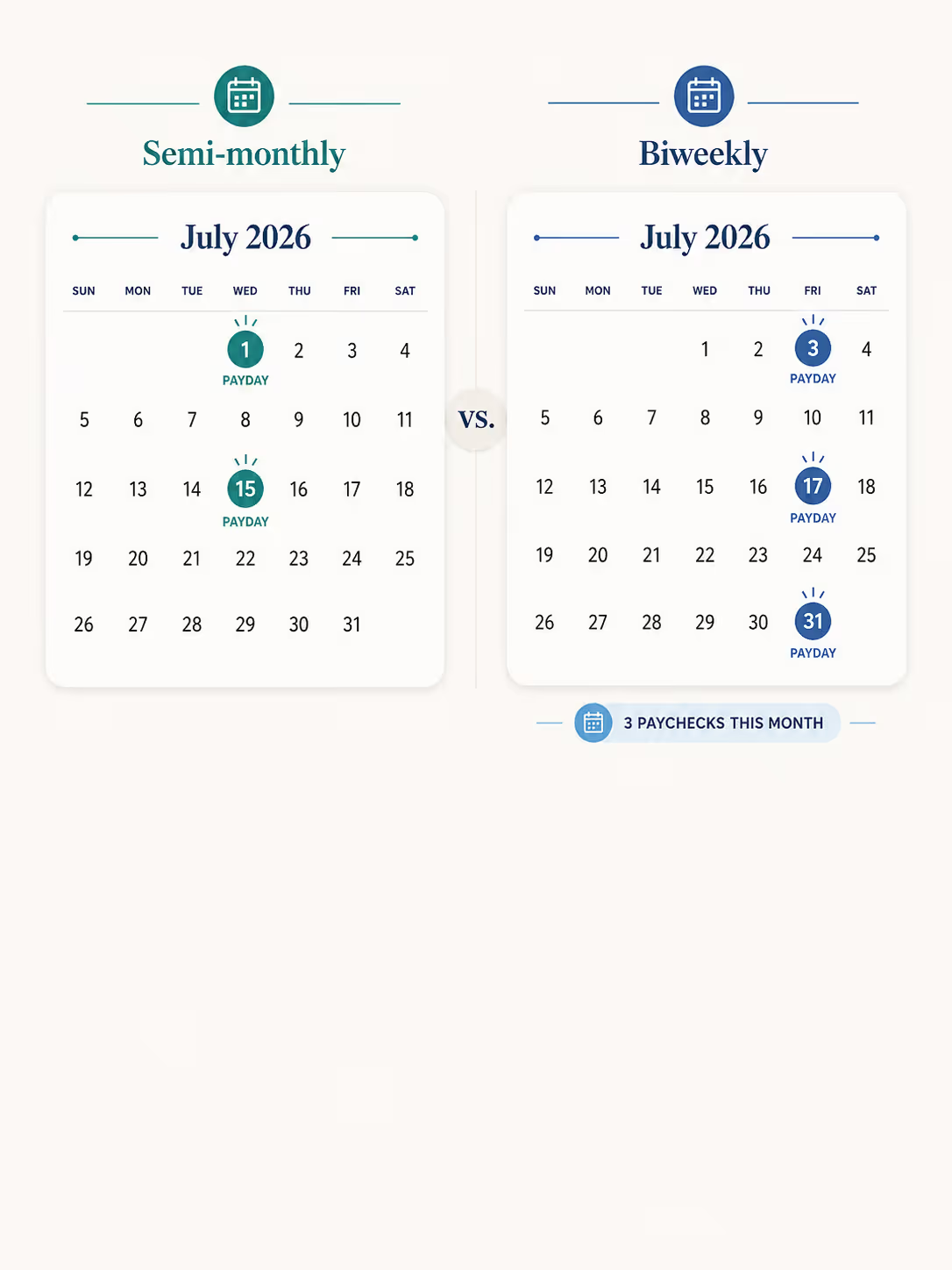
The first principle is that the system must capture the actual frequencies and timing of income and expenses, rather than smoothing everything into uniform monthly averages. Real-world cash flows don't conform to a clean monthly pattern. A biweekly paycheck creates twenty-six paydays per year, which produces three-paycheck months twice annually. Annual bills like property taxes hit once and are absent the other eleven months. Quarterly bills hit four times.
An app that ignores cadence forces the user to manually adjust every month for these anomalies. If the user is paid biweekly, they have to remember to add the third paycheck in months when it occurs and readjust their budget. They have to remember that the quarterly insurance is due this month but wasn't last month. Every month becomes its own bookkeeping project, and the user becomes the cadence engine the app failed to provide.
An app that captures cadence does this work automatically. Each income source and each bill is stored with its own frequency — biweekly on Fridays starting from a specific date, annually on April 15th, quarterly starting in February — and the system forecasts each one correctly into each period. May is not the same as June. December is not the same as January. The safe-to-spend number reflects what's actually happening in each specific period rather than a smoothed average that's accurate for no specific month.
The second principle is that the system must reconcile the plan against actual transactions continuously, producing a single safe-to-spend number that updates as actual spending occurs. This sounds obvious, but most personal finance apps fail at it because they keep planning and tracking in separate views that never interact.
A planning view is static. It shows you what you projected — your budgeted income, your budgeted expenses, the difference between the two. Once you set it up, it doesn't move based on what actually happens. If you overspend a category, the planning view doesn't update. It still shows you the plan you made, not the reality you're living in.
A tracking view is retrospective. It shows you what actually happened — income that arrived, expenses that posted, the historical record of your cash flows. It tells you where your money went, but it doesn't tell you what's left going forward.
Neither of these views, by itself, answers the safe-to-spend question. The plan tells you what you planned would happen; the tracker tells you what did happen at the current point in time. The safe-to-spend question lives in the gap between them: given the plan and given what's already happened against the plan, how much room is left? Answering this requires reconciliation — a single view that takes the plan as a starting point, applies actuals as they post, and produces a live number that reflects both. An app without a reconciliation view forces the user to do this math in their head, which defeats the purpose of using the app for safe-to-spend in the first place.
Together, these two principles form the architectural test for any safe-to-spend system. The next two sections apply them to the two interpretations of Safe to Spend, showing how the same architectural requirements lead to different specific implementations depending on whether the unit of analysis is the budget or the checking account.
The budget-based interpretation is closest to Level Money's original formula: income minus bills minus savings target equals spendable. Modern apps extend this with planned spending, savings goals, and category-level budgets, but the core question is the same — how much of my monthly budget remains discretionary?
For the budget-based interpretation, cadence-awareness means the app handles the real frequencies of income and bills within the budget framework. It correctly accounts for three-paycheck months, annual bills like taxes or insurance renewals, and quarterly obligations. The user shouldn't have to manually adjust their budget every time a non-monthly cash flow occurs.
Dynamic reconciliation means the budget produces a single "left to spend" number that updates as transactions post. The user spends $100 on shopping that wasn’t budgeted for; the safe-to-spend number drops by $100. The user receives an unexpected bonus; the safe-to-spend number rises. The number reflects the live state of the budget given everything the system knows, not a static snapshot of what was projected at the start of the month.
There's an additional capability that follows from these principles in the budget-based context: the data model needs to distinguish committed obligations from allocated spending. Committed obligations are known events with specific amounts and dates — rent on the 1st, the car payment on the 5th, paycheck on Friday. Allocated spending is an estimated pool without a specific date or transaction — roughly $600 for groceries this month, roughly $200 for gas. The two categories should be tracked differently. Committed obligations are reconciled against matched transactions as they post. Allocated pools drain as categorized transactions hit them, and unspent funds can be released back to discretionary spending without revising the underlying budget. This distinction is what allows the app to handle cadence automatically — because committed obligations carry their own cadence metadata — and reconcile dynamically — because allocated pools support both real-time drawdown and end-of-period release.
Simplifi's Spending Plan is the closest spiritual successor to Level Money. It asks for the user's income, recurring bills, savings goals, and planned expenses, then surfaces a single number — "Left this month" — representing what's left to spend.
The architectural reason Simplifi works is that it correctly implements cadence-awareness, dynamic reconciliation, as well as the committed-vs-allocated dichotomy. Recurring bills (rent, car payment, subscriptions) and recurring income are stored as known events with specific amounts and cadences. Simplifi forecasts each one correctly into the current period — biweekly paychecks produce three-paycheck months automatically, annual bills appear in the months they're due — and matches actual transactions against the saved expectations as they post. Planned spending (groceries, gas) is stored as expected pools without specific dates, which drain as categorized transactions hit them. When the user underspends a pool, Simplifi allows them to release the unspent funds back to "Left this month" without revising the underlying budget, which is another mechanism that lets the safe-to-spend number adjust dynamically as actual behavior diverges from the plan.
The result is an app that delivers on both architectural principles. Cadence is handled automatically because the data model captures it. Reconciliation is dynamic because the data model supports both transaction-matching for committed obligations and pool-draining for allocated spending. For users looking for a Level Money alternative specifically, Simplifi's Spending Plan is the most direct match.
Monarch is a capable app for many financial use cases — flexible budgeting, long-term planning, net worth tracking — but its architecture doesn't fit the budget-based safe-to-spend question, and the failure is visible in the structure of the app itself.
Monarch's Budget tab is a planning tool. It shows you what you've budgeted for income and expenses in a given month, and it computes a "Left to budget" number as the static delta between the two. The number is purely a function of the budget. If you overspend a category, "Left to budget" doesn't change — overspending is a deviation from the plan, not a change to the plan, and the Budget tab is showing you the plan. Monarch's Cash Flow tab is a tracking tool. It shows you what has happened — income that arrived, expenses that posted, the retrospective delta between the two — but it doesn't project forward and doesn't reconcile against the plan.
The two tabs run on parallel tracks and never reconcile. There's no view in Monarch that answers "given what I planned and given what's actually happened against that plan, how much do I have left?"
This failure compounds on cadence as well. Because Monarch's Budget tab treats every month with a uniform monthly budget, the user has to manually adjust their budget for cadence anomalies. Three-paycheck months require remembering to bump up the income line. Annual bills require remembering to add them in the right month and remove them in others. Quarterly bills require remembering when they're due. Every month becomes its own setup project, and the safe-to-spend number is only as accurate as the user's diligence in maintaining it.
For users whose primary need is flexible budgeting, net worth visualization, or long-term planning, Monarch is excellent. For users whose primary need is budget-based safe-to-spend specifically, Simplifi is built for that job in a way Monarch is not.
YNAB doesn't appear in the comparison table because it answers a related question through a fundamentally different mechanism. Where Simplifi and Monarch try to produce a global safe-to-spend number that the user reads off the screen, YNAB asks the user to assign every dollar to a category before spending it. The user can derive a safe-to-spend number by creating a discretionary category and treating its available balance as the answer, but the answer comes from the user's manual allocation work, not from the system computing it on their behalf. This is a deliberate design choice, not a shortcoming — YNAB is built around the principle that engaging with each dollar individually changes the user's relationship with money, and a single pre-computed safe-to-spend number undermines that engagement.
If the user wants envelope budgeting with explicit dollar assignment and is willing to do the allocation work each pay period, YNAB is excellent and many users prefer the engagement model. If they want a single Safe to Spend number computed automatically from their inputs in the Level Money tradition, YNAB is solving a different problem.
The checking-account interpretation is closest to Simple's Safe-to-Spend® formula: account balance minus reserved money equals what's truly available. Modern apps extend this with forward-looking forecasts — instead of just subtracting today's reserved money, the app projects upcoming bills and income to determine whether any money is actually available to spend. The question being answered is liquidity-focused: how much can I spend right now without putting my checking account at risk?
For the checking-account interpretation, cadence-awareness means capturing each cash flow event at its real-world frequency — this paycheck biweekly on Fridays, that bill on the 1st, insurance quarterly — rather than smoothing them into a monthly average. Dynamic reconciliation means updating against actuals as transactions post: a matched bill confirms the projection and it carries forward from the new balance; an unexpected charge bends the trajectory.
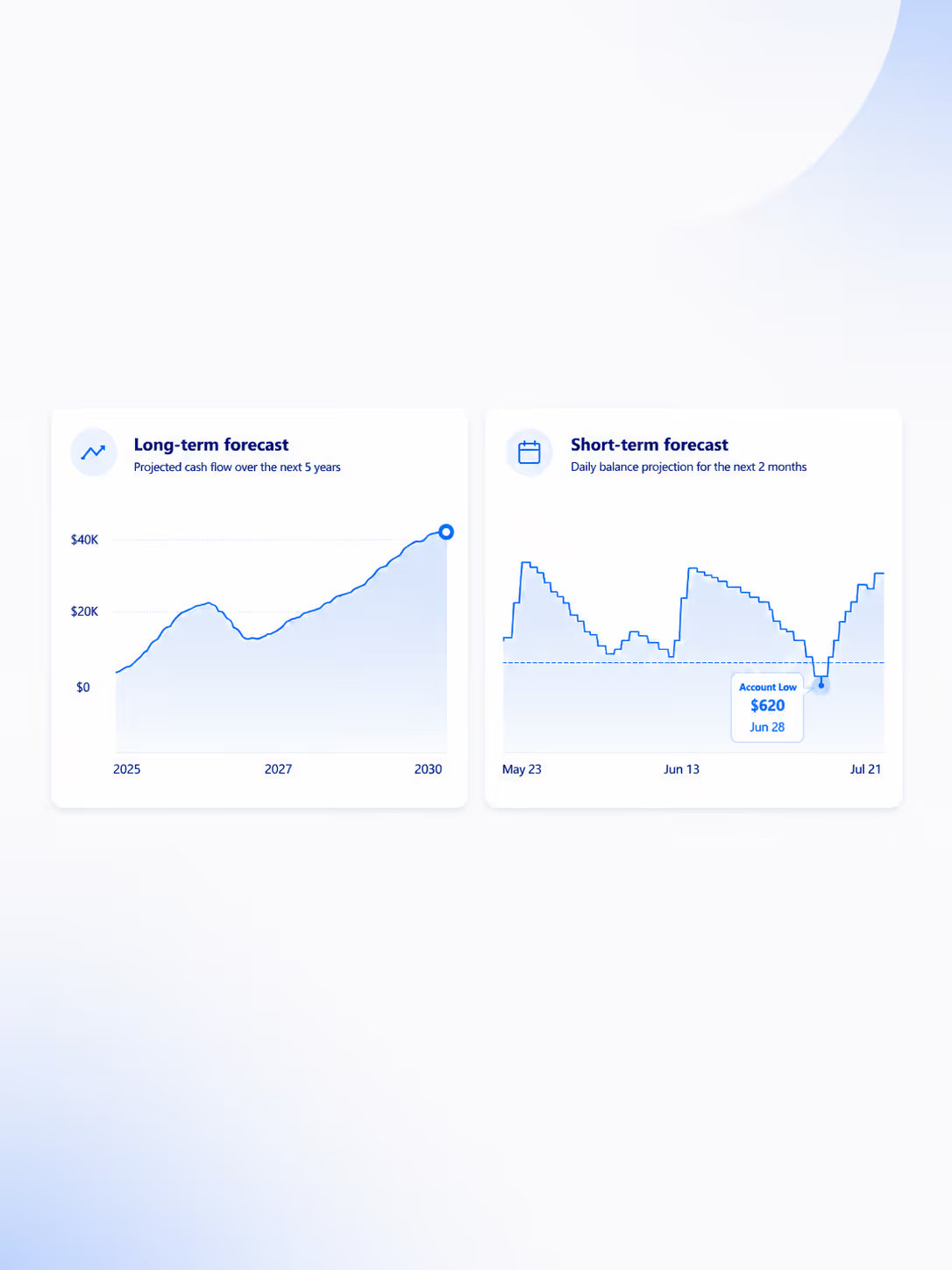
Applied to a checking account, those two principles produce one thing: a forward balance projection — a checking account cash flow forecast. Because the forecast walks the balance through the whole period, subtracting bills as they hit and adding income as it arrives, it surfaces the lowest point the balance is projected to reach. That low point is what actually governs the question this interpretation asks — how much can you spend now without putting the account at risk later — because if you clear your lowest projected point, you clear every other day too. An app that delivers cadence-awareness and dynamic reconciliation on a checking account gives you that number; an app that doesn't, leaves you guessing at it.
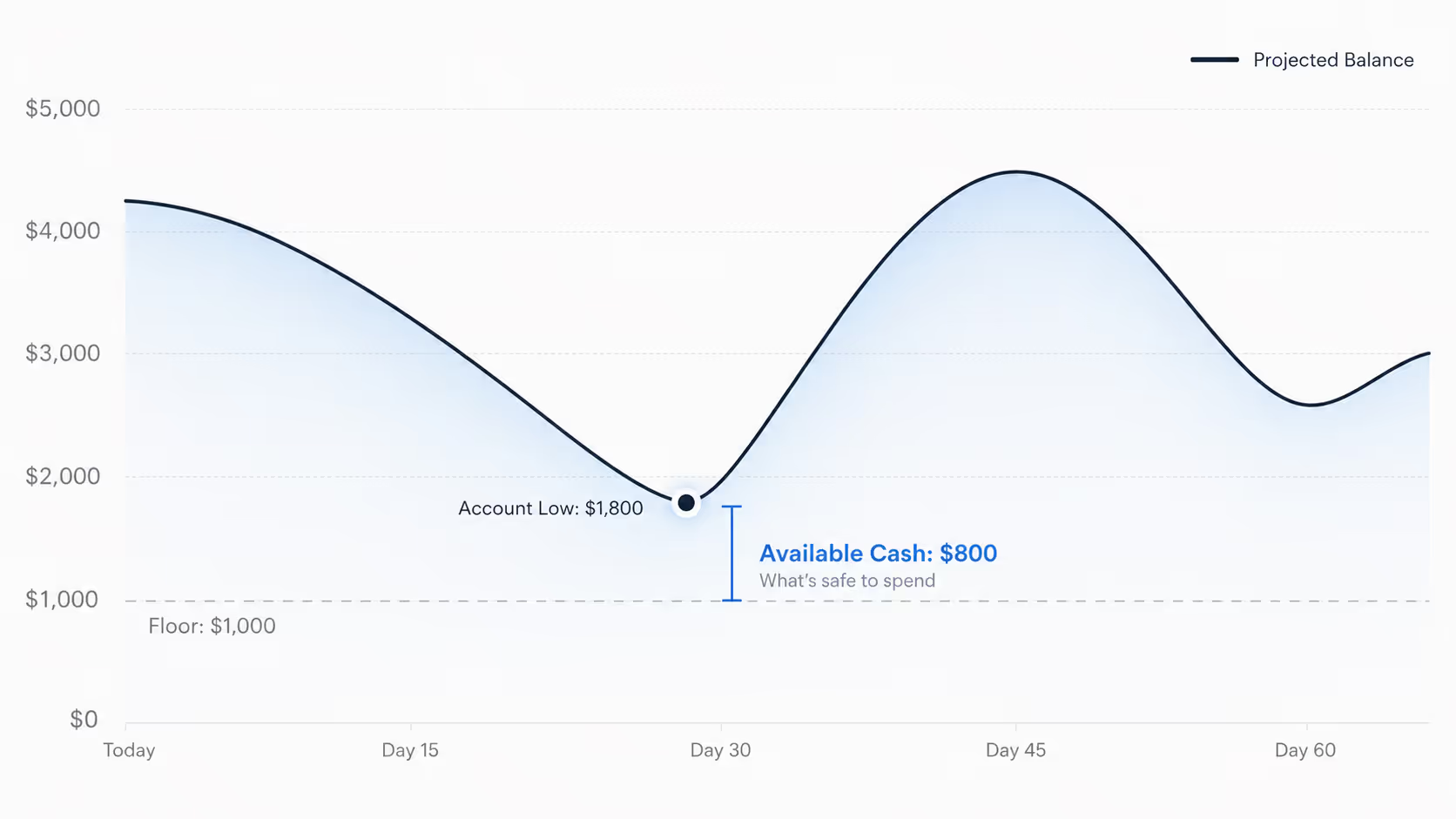
Centinel implements exactly this. It computes a metric it calls Available using a deterministic two-month forecast of the user's checking account. Saved events carry full cadence metadata — paychecks with their real frequency and start date; bills on weekly, biweekly, monthly, semi-monthly, quarterly, semi-annual, or annual cycles; one-time future income or expenses — and the forecast walks the projected balance forward through every one, producing a day-by-day trajectory.
Reconciliation runs continuously. As transactions post, Centinel matches them against saved events; matched transactions confirm the forecast and it continues forward from the new actual balance, while unexpected ones adjust the trajectory. The forecast's lowest projected point is the Account Low, recalculated every time the forecast updates.
Where Centinel goes a step further is the Floor. Most users don't want to spend down to $0, so Centinel lets the user set a minimum balance they want to preserve, then computes what's safe to spend as Account Low minus Floor — the amount they can move out of checking, to savings, investments, or discretionary spending, without putting the account at risk at any point in the forecast. Cadence-awareness lives in the event metadata; dynamic reconciliation lives in the matching system; the two-month horizon is long enough to catch bills that are coming but not yet imminent and short enough to stay reliable. For anyone looking for a Simple alternative that extends Safe-to-Spend® with forward-looking forecasting, Centinel is the most direct match.
Rocket Money's Safe to Spend feature targets the right interpretation — it frames itself around avoiding overdrafts — but its architecture has significant gaps.
On cadence-awareness, Rocket Money's Safe to Spend lives inside its Payday View, which requires a connected paycheck account with at least three consistent paychecks before the feature activates. Users cannot manually add income, which means variable-income households, side income, and any payment that doesn't post as a recognizable paycheck are invisible to the calculation. The forecast horizon is locked to "before your next payday," which means a large bill scheduled for payday itself produces a falsely confident Safe to Spend number, because the bill hasn't crossed the payday boundary yet. Bill dates are projected using a naïve "approximately 30 days from the last payment" heuristic rather than a calendar-aware schedule, which causes systematic drift across short months. There is also no primitive for one-time future expenses. A $1,200 vet bill on Thursday or a tuition payment due next week cannot be entered as a forecasted event that flows into Safe to Spend; the obligation is invisible to the calculation until it posts.
On dynamic reconciliation, Rocket Money's Safe to Spend number does update as transactions post — your cash balance drops when you spend, and the system re-detects bill patterns as new transactions arrive. But there's no persistent ledger of user-declared forecasted events for the system to reconcile against. The user doesn't tell Rocket Money "rent is $1,500 on the 1st"; the system infers a rent-like recurring charge from past transactions and projects the next occurrence approximately 30 days after the last one. When a transaction posts, it isn't matched against an expected event — it's absorbed into the pattern set and the system re-projects from scratch. The result is that the Safe to Spend number changes continuously, but it isn't reconciling a plan against reality; it's continuously re-detecting patterns and recomputing. This is a meaningfully weaker form of reconciliation than what an event-based architecture provides, and it's why users can't correct the system's expectations or pin down specific upcoming events.
Beyond these two principle-level failures, Rocket Money has no concept of a Floor. Safe to Spend tells the user what would zero out their account before next payday, not what's safe to spend while preserving a user-defined safety margin. Users have to mentally apply their own buffer, which puts the cushion math back on the user the system was supposed to do for them.
These differences are the core behind how Centinel and Rocket Money differ in their approaches to producing a safe-to-spend number.
The decision is usually clear from how the question feels in practice. Choose budget-based Safe to Spend, and use Simplifi, if you want a single discretionary spending allowance for the month. Choose checking-account Safe to Spend, and use Centinel, if you want to know how much cash is genuinely available without risking an overdraft/low balance, or if you're trying to decide how much to move from checking to savings.
Both questions are about not overspending, but they're not the same kind of overspending. Budget-based Safe to Spend protects against blowing your budget. Checking-account Safe to Spend protects against overdrafting your account. These are different kinds of risk, which means many users will benefit from answering both questions, not just one. Someone who uses Simplifi to pace their monthly discretionary spending might still want Centinel to confirm that this month's higher-than-usual bill schedule isn't going to put their checking account at risk. Someone who uses Centinel to manage liquidity might still want Simplifi to keep their overall budget on track. The two apps aren't competitors for the same job; they answer different questions and can productively coexist in the same financial workflow. If you've been searching for a Level Money alternative or Simple alternative without finding a satisfying match, the replacements exist — Simplifi for the Level Money lineage, Centinel for the Simple lineage.
Centinel is currently in pre-launch — join the waitlist for early access.
Safe to Spend is a metric popularized by Simple bank (as Safe-to-Spend®) and Level Money (as "Spendable") representing how much money the user can spend without putting their finances at risk. Today the term has two interpretations. The first is a budget-based spendable allowance — roughly income minus bills, savings goals, and planned expenses for the period. The second is a checking-account available amount, which requires forecasting the account forward through upcoming bills and income to find the lowest projected balance, then subtracting a user-defined safety margin to determine what can actually be spent without risking an overdraft or low balance.
For Simple's specific framing — checking balance minus reserved money — Centinel is the closest current alternative. Centinel extends the concept with a two-month forecast that walks the checking balance forward through upcoming bills and income, finds the lowest projected point in the forecast (the Account Low), and subtracts the user's chosen safety margin (the Floor) to produce the safe-to-spend number, which Centinel calls Available.
For Level Money's specific framing — income minus bills and savings, converted to a daily, weekly, or monthly allowance — Quicken Simplifi's Spending Plan is the closest current alternative. It computes a discretionary spending number from the full budget and updates as transactions post.
Monarch's "Left to Budget" is a static delta between projected income and projected expenses for the month. It's a planning view, not a reconciliation view. If you overspend a category, "Left to Budget" doesn't change because the number reflects the plan, not what's actually happened against the plan. Monarch's Cash Flow tab shows actuals retrospectively but doesn't project forward or reconcile against the plan. The two views never meet, which means there's no number in Monarch that answers the safe-to-spend question directly.
Not in current market offerings.
Yes, but with significant limitations. Rocket Money's Safe to Spend lives inside its Payday View, which requires a connected paycheck account with at least three consistent paychecks, doesn't allow manual income entry, only includes bills paid from the connected account, doesn't support a user-defined Floor, has no primitive for one-time future expenses, and uses a "before next payday" horizon that can produce falsely confident numbers if a large bill is scheduled for the day after payday.
Level Money was acquired by Capital One in 2015 and shut down in September 2017, with Capital One citing the broader maturation of personal finance management tools. Simple was acquired by BBVA in 2014 and operated as a subsidiary until BBVA's U.S. operations were acquired by PNC in 2021. PNC chose not to maintain Simple as a separate brand and shut it down in May 2021, migrating customers to PNC's standard banking platform. Both shutdowns left users searching for replacements, which is why "Simple alternative" and "Level Money alternative" remain active search queries years after each app's discontinuation.
Centinel is currently iOS-only. Android is on the roadmap but not yet available.
STAY A STEP AHEAD