Cash flow forecast apps split into two jobs: long-range and short-term forecasting. Here's which projects what — and which fits you.
June 3, 2026
Most personal finance apps look backward. They sort what you already spent and tell you where the money went. A cash flow forecast app looks forward: it projects where your money is headed. That shift — from "where did my money go?" to "where is my balance going?" — is the whole point of the category.
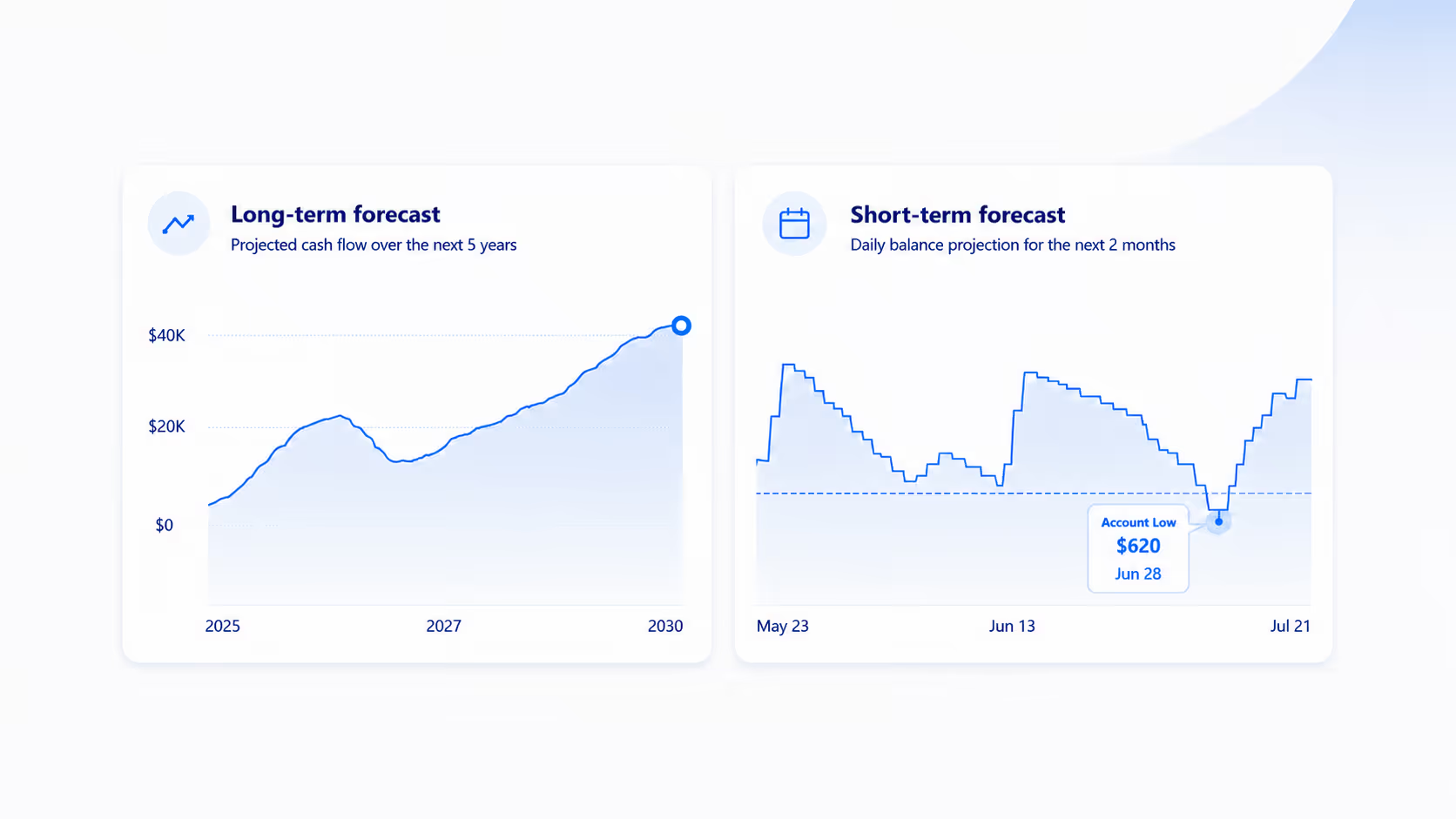
But "cash flow forecasting" isn't one thing. It splits cleanly by horizon into two different jobs, and the confusion between them is why so many people end up with the wrong app. One job is long-range: projecting your whole financial picture across years to see the trajectory of your finances or plan big decisions. The other is short-term: projecting your checking account day by day over the next couple of months to see whether it holds up.
The apps that genuinely forecast fall into those two camps. Long-range planners — Quicken Simplifi, PocketSmith, and Monarch Plus — project net worth and cash flow over months to decades, so you can see the trajectory of your finances or model retirement, a home purchase, or a career change. Short-term tools project your checking account day by day; the field is narrow, and Centinel is purpose-built for it. Most popular "money apps," including YNAB, Rocket Money, and Monarch's standard view, don't forecast a forward balance in any meaningful sense — they primarily budget or track. This guide sorts the field by the horizon you actually need.
Disclosure: we make Centinel, so we have a stake in this comparison. We've worked to describe every app accurately, and where another tool is the better fit, we say so.
A cash flow forecast app projects where your money is headed rather than tracking where it went. The tools that do this build the projection from what you already know: in most of them, the income and bills you have scheduled, walked forward across future dates; in the longer-range ones, the assumptions you set about the future, like investment returns or a decision to retire early. Either way, the output is something you don't have yet — a future balance, a trajectory, or a net-worth path.
That forward view is the dividing line. An app that only categorizes past spending or tells you how much is left in a budget category isn't forecasting, no matter how polished it is. Forecasting means projecting a number into the future.
Several of the most popular money apps don't project a forward balance at all — over any horizon. YNAB assigns every dollar a job: a budgeting method, not a projection. Rocket Money centers on subscriptions and spending visibility. Copilot is polished tracking. Monarch's standard Cash Flow view shows budgeted income against expenses for the month — a budgeting output, not a forecast of your real balance. These are good at their jobs, but they tell you where your money went or how this month's money is allocated, not where your balance is headed. (Monarch's premium tier is a genuine forecaster — more on it below.)
It's also worth clearing up a source of search-result noise: most software literally called "cash flow forecasting" is built for businesses — invoicing, payables, receivables, treasury reporting. Useful for a company, irrelevant to a checking account.
Once you set aside the apps that don't forecast at all, the ones that do divide by horizon — and the horizon decides almost everything about which tool fits you.
Long-range forecasting answers planning questions. What’s the shape and trajectory of my finances? Can I afford a bigger place in three years? When can I realistically retire? What happens to my net worth if I change one assumption? These tools are built for scenarios and the long arc. They run in months, years, and decades, at monthly or yearly resolution.
Short-term forecasting answers a liquidity question: will this checking account stay above $0 — and above the cushion I keep — at every point over the next two months? If it won't, when does the shortfall hit, and how much do I need to cover it? If it will, how much is free to spend or move to savings or investments? Answering that for one account, day by day, is what checking account cash flow forecasting does.
Long-range and short-term forecasting pull in opposite directions. A long-range planner smooths over the day-to-day timing that decides whether you overdraft next week; a short-term tool isn't trying to project your net worth in a decade. An app built for one is rarely good at the other — which is why "best cash flow forecast app" has no single answer until you name the horizon.
These three share a horizon but not a method, and the difference is worth knowing before you choose. Simplifi and PocketSmith project the income and bills you've scheduled forward over a long window. Monarch Plus does something different — it models how your finances would unfold under assumptions you set. All three answer long-range questions; none is built to tell you whether your checking account survives the next two months.
Simplifi's forecast, Projected Cash Flow, charts where your all of your account balances are headed — checking, savings, and credit cards on one graph, each a line you can toggle on or off. The window runs from two weeks to a full year and defaults to a month, and a configurable alert warns you if any balance is projected to go negative. It's a trajectory view: the shape of your whole picture over time, focused on the end-of-day balance.
One clarification, because it's easy to conflate: Simplifi's "how much is left this month" figure comes from its separate Spending Plan, a budgeting feature — it isn't part of the forecast. The forecast itself sits inside a full personal-finance app with goals and investment tracking. Simplifi is billed annually at about $83.88, with no monthly option and no free tier, though the first year is often discounted.
PocketSmith is the planner's tool: calendar-based projections and what-if scenarios you can run years into the future (up to 60 years) across many accounts. Unlike Monarch Plus, it doesn't lean on return or inflation assumptions — it projects the events and patterns you give it forward over a long window. It's a strong pick for mapping different futures, with a heavier interface and a long-view focus rather than day-to-day checking. It offers a free tier alongside paid plans.
Monarch's premium tier ($199/year, launched April 2026) is a genuine long-horizon forecaster, but a different kind. Rather than walking scheduled transactions forward, it models how your finances would unfold under assumptions you set — spending levels, investment returns, and life events you drag onto a timeline: retire at 58, buy a house in three years, take a year off. It projects net worth over years and decades at monthly or yearly resolution, and it's currently desktop-web only. That makes it powerful for big decisions and silent on next Tuesday's checking balance. (Monarch's standard Core tier, $99.99/year, doesn't forecast a forward balance at all, as noted above.)
Centinel's checking account forecast does one thing: a two-month, day-by-day projection of your checking account. You set a Floor — the minimum balance you want to stay above — and it walks your known income, bills, transfers, and card payments forward across the whole window. It surfaces the lowest point your balance is projected to reach, checks every day against both $0 and your Floor, and, if you're safe, tells you the surplus that's free to spend or move. If a shortfall is coming, it tells you the date and the amount, so you can act before it happens. As real transactions post, it reconciles them against the forecast to keep the projection honest.
It isn't a budgeting suite and doesn't touch your other accounts — the forecast is the entire product. There's a free tier for manual entry, and the premium tier, which adds bank connectivity, automated syncing, transaction matching, and push alerts, which is $7.99/month or $69.99/year, with a 30-day free trial.
This end of the market is thin. Dedicated short-term checking forecasting has the fewest serious entrants of anything in this guide.
Two of the most common reasons people go looking for a forecast turn out to be the same question from opposite ends: will I overdraft, or how much can I safely spend? Both fall out of a short-term checking forecast. Each has its own comparison. The best apps that predict overdrafts are judged on whether they run a genuine day-by-day forecast and surface a projected shortfall — under conservative, worst-case same-day timing — early enough to act on. The best apps for what's safe to spend from a checking account are judged on whether they reconcile that projection against real transactions as they post in order to keep the forecast accurate and actionable over time.
The table up top maps the lanes; the decision underneath it is simple. If your question is about the long arc — affording a move, modeling retirement, watching net worth across years — choose Simplifi or PocketSmith to project what you've already scheduled, or Monarch Plus to model scenarios under assumptions you set. If your question is about the next two months on one checking account — whether it holds at every point, how much room you have, when a shortfall lands — choose Centinel.
The two horizons aren't mutually exclusive. Run Simplifi, PocketSmith, or Monarch Plus for the long arc and Centinel for the next two months; they’re complementary.
Centinel is currently in pre-launch. If you'd like to be among the first to try it, you can join the waitlist.
It's an app that projects where your money is headed rather than summarizing what you spent. It builds that projection from what you already know — the income and bills you have scheduled, and in longer-range tools, assumptions you set about the future — and outputs a forward balance, a trajectory, or a net-worth path you don't have yet. The horizon varies: years for planning tools, day by day over the next couple of months for short-term checking tools.
Long-range forecasting projects your overall picture — balances, cash flow, or net worth — across months, years, or decades, so you can model big decisions. Short-term forecasting projects a single checking account day by day over the next weeks to show whether the balance holds up and what's safe to spend. They answer different questions, and most apps are built for one or the other.
Not day by day. Monarch's standard Cash Flow view is a budgeting output — monthly income against budgeted expenses — not a balance projection. Monarch Plus ($199/year) adds real forecasting, but it models net worth over years at monthly or yearly resolution under assumptions you set; it won't tell you what your checking balance will be on a specific day.
Centinel is built specifically for a day-by-day, two-month projection of one checking account. Quicken Simplifi also shows a projected checking balance, but alongside your other accounts on a single trajectory graph at end-of-day resolution — a planning view across accounts rather than a day-by-day decision tool for one.
For the "will my checking account hold up over the next two months, and what's safe to spend" question, Centinel is purpose-built for this — a deterministic two-month forecast with a Floor you set and alerts before your balance breaches it. The short-term checking field is thin; long-range tools can be pointed at a shorter window but aren't designed for it.
Some are partly free. Centinel has a free tier for manual entry, and PocketSmith offers a free tier alongside paid plans. Quicken Simplifi has no free tier. Most dedicated forecasting tools are paid, usually with a free trial, and the automated bank syncing that keeps a forecast current is typically a paid feature, so free options tend to require more manual upkeep. Check current pricing before committing, as it changes.
Business cash flow software centers on invoices, accounts payable and receivable, payment terms, and company financial reporting. Personal cash flow apps focus on household bills, paychecks, transfers, and your future personal account balance. If your question is whether your checking account survives the month, you want a personal tool — most results for generic "cash flow forecasting software" are built for companies.
STAY A STEP AHEAD